

Glossary
On this page
Definitions for the vocabulary used across the roar and GLaaS docs.
Main entities
Session
A session is the local context for a sequence of roar run commands. It captures everything you've recorded since the last roar reset, and it's what roar derives the local DAG from. One session, one local DAG. Confusingly, GLaaS-side records sometimes call the registered version of a session a DAG for short — see DAG below.
DAG (Directed Acyclic Graph)
The graph of jobs and artifacts that produced an artifact. Each session has one local DAG; you can also publish a snapshot of it as a registered DAG on GLaaS. The two aren't identical — the local session evolves as you re-run things; the registered DAG is frozen at register time. When you view a "DAG page" on glaas.ai, you're looking at a registered DAG.
Job
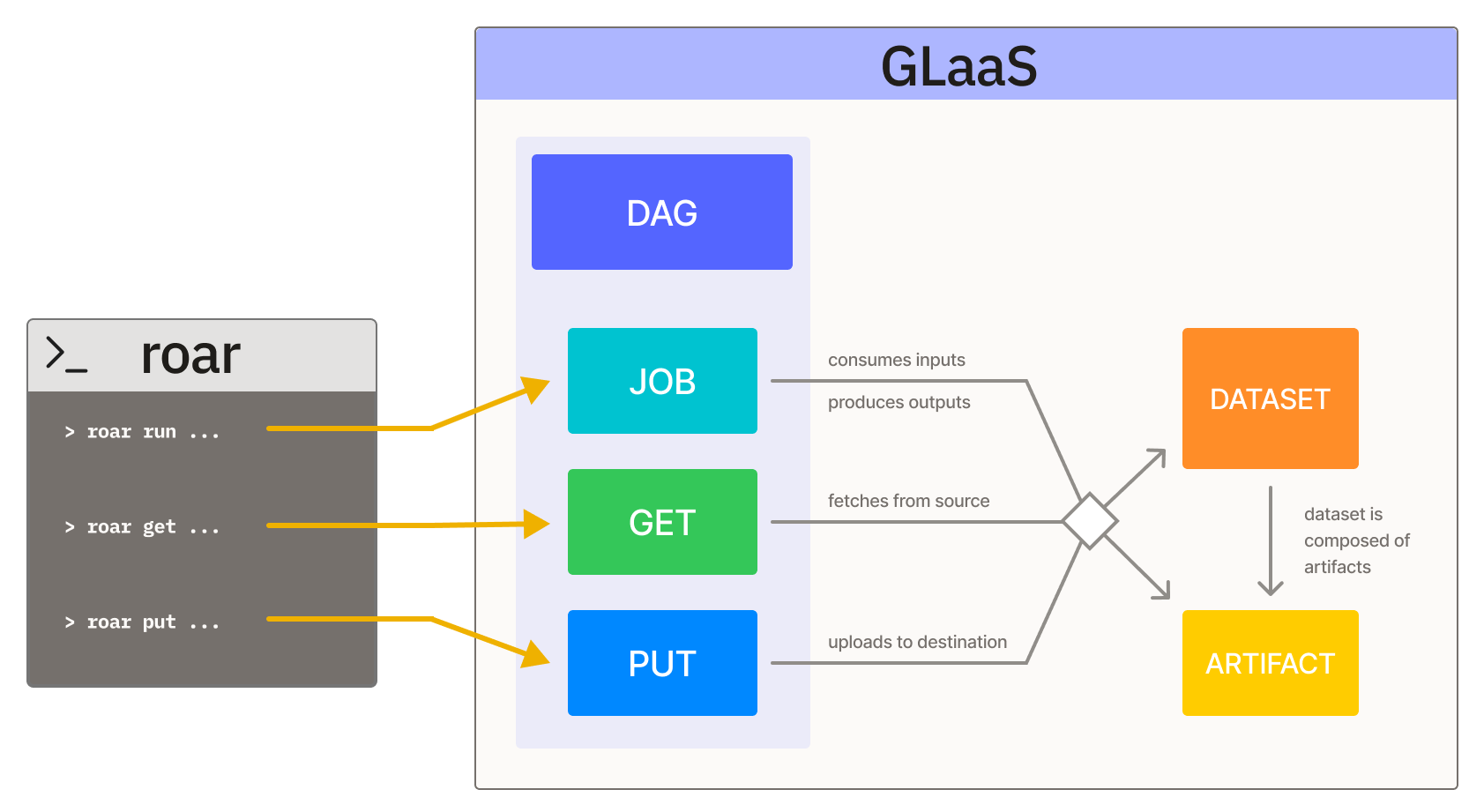
A single recorded command execution. Active node in the DAG. Created by roar run, roar build, roar get, or roar put. Jobs consume input artifacts and produce output artifacts.
Artifact
A file (or composite artifact) identified by its content hash, not by filename or path. Passive node in the DAG — sits between jobs that produce and jobs that consume it.
Composite artifact
An artifact representing a directory or multi-file collection (a dataset, a sharded checkpoint) as a single tracked unit with one content hash. Component files are still recorded internally for introspection, but the DAG shows the composite as one node. See Composite Artifacts.
Component
An individual file inside a composite artifact. Records the relative path within the composite and the component's own hash.
Dataset View
A job-scoped selection of a composite artifact (dataset). Where a dataset represents the full collection of component parts, a dataset view records the specific subset that a particular job consumed or produced. The selection is encoded as a bloom filter, enabling probabilistic membership queries ("did this job touch this specific part?") without storing an explicit list of every selected component hash. A single dataset can have many views across different jobs in a DAG — for example, a Get job might produce 500 of 10,000 parts, while a downstream Job reads only 200 of those same parts.
Registered DAG
A snapshot of a session published to GLaaS via roar register. Becomes globally lookup-able by hash. The local session it was registered from can evolve afterward without changing the registered DAG.
Hashes and identity
Content hash
A hash of an artifact's bytes — the artifact's identity. If two files share a content hash, they are the same artifact regardless of where they live or what they're called.
blake3
roar's default content-hashing algorithm. 256-bit output, fast, ~2× sha256 single-threaded and 5–10× with SIMD. Falls back to sha256 if the blake3 Python module isn't installed. See Hashes.
sha256
256-bit content hash; widely used (Hugging Face, git, IPFS, Docker, TLS). roar can compute it alongside blake3 per operation when configured; useful for cross-tool identity checks. See Hashes.
composite-blake3
A path-sensitive Merkle-tree-style hash over a locally-formed composite artifact: blake3 over the component file hashes plus their relative paths. Deterministic across same-input/same-layout, sensitive to any component change. Used by roar put and roar register. See Composite Artifacts.
composite-sha256
A composite hash derived from the LFS sha256 oids in a Hugging Face dataset manifest. Computed from repo metadata without downloading the full dataset, giving a stable identity anchor for any HF dataset at a given commit. Used by roar get hf://. See Composite Artifacts.
ETag
The hash S3 returns on PutObject / GetObject. For single-part uploads it's MD5 of the body; for multipart it's MD5(concat(MD5(part_1), MD5(part_2), …))-<N>, which is not a content digest. roar records ETag as one of an artifact's hash algorithms (via the Proxy) but treats blake3 as the source of truth for content identity.
Operations and characteristics
Get
A roar get invocation, or the input-side of any job: an operation where a job reads an artifact. Get as a CLI command (roar get) creates a Get-type job recording data entering the workspace from outside; Get as an edge in the DAG just means "this job read this artifact."
Put
A roar put invocation, or the output-side of any job: an operation where a job writes an artifact. Put as a CLI command (roar put) creates a Put-type job recording data leaving the workspace; Put as a DAG edge just means "this job wrote this artifact."
Tracers, proxy, and integrations
Tracer
The component that observes file I/O during roar run. roar ships three backends — eBPF, preload, ptrace — and picks one via auto-fallback. See Tracers.
Proxy
roar's S3 reverse proxy. Captures GetObject / PutObject traffic so cloud-storage I/O ends up in the lineage. Today: AWS only; GCP on the roadmap. See Proxy.
Fragment
A streamed lineage event from a Ray worker (or any distributed runner) to the driver. Encapsulates one task's reads and writes; the driver-side reconstituter merges fragments into the local DB after the job exits. See Ray.
Annotations and visibility
Label
A user-attached key/value annotation on a session, job, or artifact. The way to record metadata that isn't observable from the run alone — metrics, comments, tags, experiment IDs. Searchable on glaas.ai. See Labels.
Scope
The persistent visibility setting on a roar workspace — anonymous, private, public, or <owner>/<project>. Governs who can read the records registered from that workspace. See Scopes.
Dataset fingerprint
A heuristic identifier roar attaches to composite artifacts it recognizes as datasets — based on the directory shape, manifest files, and file types present. Surfaces as dataset.id, dataset.modality, dataset.type labels.
Relationship overview
The following diagram shows how these entities connect to form the lineage of your work.
Inspecting the DAG
From the CLI:
- View the current DAG:
roar dag - Inspect a specific job:
roar show <job-id>(orroar show @<step>) - Inspect an artifact or path:
roar show <hash-or-path>
On glaas.ai, click any job or artifact to navigate its upstream and downstream connections.